


When evaluating a Computer Telephony Integration deployment, one question comes before platform choice or vendor shortlists: where does the CTI infrastructure live? The answer impacts everything from your budget and control to your team’s agility and security posture.
Is the promise of instant cloud scalability worth the trade-off in customization and carrier lock-in? Does the total control of an on-premise system justify the immense upfront cost and ongoing security burden? According to Gartner’s contact center research, scalability is the primary driver of CCaaS adoption, yet heavily regulated industries still rely on on-premise systems for data residency certainty.
This guide cuts through the noise, covering on-premise vs. cloud CTI, key differences, benefits, and risks, and revealing where the hybrid model wins by combining on-premise control with wholesale carrier connectivity. New to CTI? Start here, What Is Computer Telephony Integration (CTI)? The 2026 Guide for Contact Centers.
What Is On Premise vs. Cloud CTI?
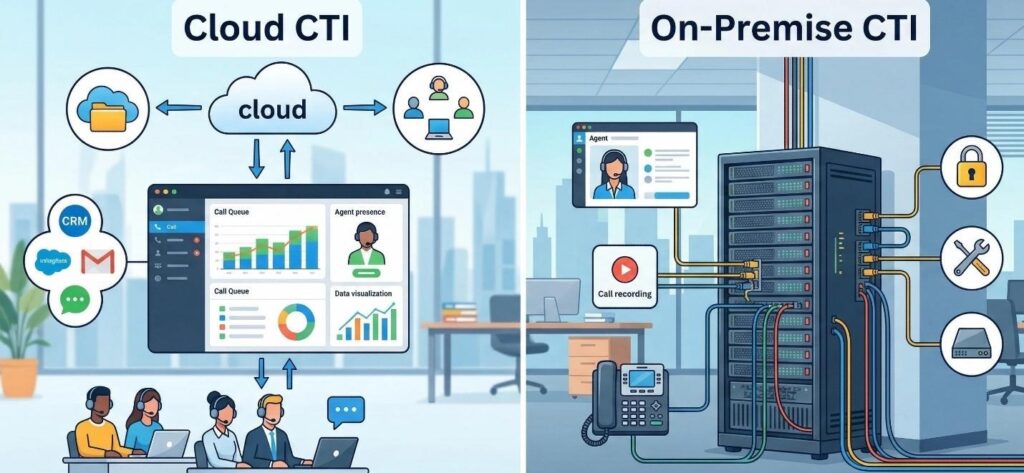
On-premises CTI means your telephony infrastructure, the PBX, ACD, IVR, and CTI middleware, runs on servers you own, inside your building, managed by your IT team.
Cloud CTI means those same functions are delivered by a third-party CCaaS (Contact Center as a Service) provider over the internet, platforms like Genesys Cloud, NICE CXone, or Five9. Your agents access the system through a browser or softphone app from any location. The provider manages the infrastructure, software updates, and uptime underneath.
The core difference is ownership and operational responsibility. On-premises means your hardware, your maintenance, your control. Cloud means the provider’s infrastructure, their SLA, and a usage-based bill. Neither is universally better, the right answer for a 20-seat support team looks very different from the right answer for a 500-seat BPO.
On-Premise vs. Cloud CTI: Key Differences
| Dimension | On Premise CTI | Cloud CTI |
| Infrastructure location | Your servers, your building | Provider’s data centers |
| Upfront cost | High, hardware, licenses, integration | Low to none, OpEx model |
| Ongoing cost | Power, maintenance, IT staffing | Per-seat or per-minute subscription |
| Call routing control | Full, you own the logic | Platform-dependent configuration |
| Scalability | Hardware procurement required | Instant, provision in minutes |
| Security | Your full responsibility | Shared responsibility model |
| Compliance | Easier data residency proof | Provider certifications required |
| Carrier layer | SIP trunks from your chosen carrier | Often bundled, limits flexibility |
| Customization | Deep, integrates with any CRM or stack | Platform constrained |
| Disaster recovery | Complex, costly to build | Often included |
On-Premise CTI: Benefits and Risks
On-Premise CTI Benefits
Complete call routing control: On premise CTI, typically built on FreePBX, 3CX, or Cisco CallManager, gives you total control over routing logic, IVR flows, queue prioritization, and CRM integration depth. No vendor dictates what your call flows look like.
Data stays on site: For organizations in healthcare, financial services, or government, where HIPAA, PCI DSS, or FedRAMP compliance applies, on premise CTI makes data residency straightforward to prove. Call recordings, CDRs, and interaction data never leave your infrastructure. This is why heavily regulated industries still run on premise CTI in 2026.
Carrier freedom. On premise CTI decouples call control from the carrier. You choose your SIP trunking provider independently, connecting directly to wholesale rate carriers for voice termination at significantly lower per minute rates, rather than accepting the bundled carrier a cloud CCaaS platform imposes.
On Premise CTI Risks
High upfront investment: Server hardware, PBX licensing, CTI middleware, CRM integration, and IT headcount represent significant capital expenditure before the first call is made. For mid-size contact centers, total setup costs typically run from $50,000 to over $200,000, depending on seat count, integration depth, and hardware specifications.
Slow to scale: Adding capacity means procuring and physically installing hardware. For contact centers with seasonal spikes or rapid growth, that lead time is a competitive disadvantage; most end up over-provisioning capacity upfront simply to avoid being caught short during demand surges.
Full security and DR burden: Patching, access control, incident response, offsite failover, and backup power are all your responsibility. Building genuine redundancy costs significantly more than the equivalent built into cloud platforms.
Cloud CTI: Benefits and Risks
Cloud CTI Benefits
Fast deployment and instant scalability: Cloud CTI platforms are provisioned in hours, not weeks. Agent seats and call channels scale in real time, triple campaign capacity for a quarter, then scale back with no hardware changes. Gartner’s contact center research identifies scalability as the primary driver of CCaaS adoption.
Built in redundancy and managed compliance: Major CCaaS providers operate across multiple availability zones, a data center failure doesn’t take your contact center down. Leading platforms also carry HIPAA, PCI DSS, SOC 2, and ISO 27001 certifications, transferring significant compliance burden to the provider.
Cloud CTI Risks
Carrier lock-in and per-seat cost at scale: Most cloud CCaaS platforms bundle their own voice carrier, so you pay retail termination rates rather than wholesale. Per-seat pricing scales linearly with headcount; high-volume outbound contact centers typically find direct SIP trunking against a self-managed PBX substantially cheaper at scale.
Data control complexity and connectivity dependency: Proving where customer data resides in a cloud environment requires contractual due diligence and ongoing vendor monitoring. Cloud CTI also depends entirely on internet connectivity; jitter or latency degrades call quality in ways on premise CTI avoids by keeping call processing local.
The Hybrid Answer: On-Premise Control, Cloud Carrier Connectivity
The most cost-effective model for high-volume contact centers isn’t choosing between on premise and cloud, it’s combining on premise CTI control with wholesale carrier connectivity.
Your contact center runs an on premise PBX, FreePBX, 3CX, Asterisk, handling all routing, CTI logic, and CRM integration. IDT Express SIP trunking connects that system to the global PSTN with A Z Platinum CLI routes, DID numbers in 160+ countries, and Toll Free Numbers across 70+ countries, at wholesale carrier rates, no per-seat markup.
The same approach works for cloud CTI via BYOC. Running Twilio, Genesys, Plivo, or Microsoft Teams? IDT Express connects as the underlying carrier through Bring Your Own Carrier, you keep the CCaaS features, and replace the bundled retail carrier with direct Tier 1 wholesale access.
IDT Express has operated this hybrid carrier model for 30+ years, terminating 7.5 billion minutes annually on scalable AWS-based infrastructure, trusted by BT, Orange, Vodafone, and Etisalat, and the preferred voice carrier for leading CCaaS, UCaaS, and CPaaS platforms globally. Dedicated Call Center Termination Routes cover 30 to 40 countries. Mr. Caller ID monitors outbound number reputation across the USA, and a free STIR/SHAKEN attestation check is included. Concierge support is standard, not a ticket queue.
Talk to a CTI Infrastructure Specialist Free assessment of your current setup, on premise, cloud, or hybrid. Find out where IDT Express carrier connectivity reduces costs and improves call quality.
Frequently Asked Questions
What is the difference between on premise and cloud CTI?
On premise CTI runs on hardware your organization owns on site, giving full control over call routing, data residency, and carrier choice. Cloud CTI is delivered by a provider over the internet, offering faster deployment and scalability with less control over the underlying infrastructure.
Is on premise CTI safer than cloud CTI?
Not automatically. On premise gives full control but security is entirely your responsibility. Cloud CTI from a certified provider brings managed security, SOC 2 and ISO 27001 certifications, and professional incident response. Regulated industries often prefer on premise for data residency certainty.
What are the disadvantages of on premise CTI?
High upfront hardware costs, slow scalability, full maintenance and security burden, complex disaster recovery, and the need to independently source and manage SIP trunking rather than using a bundled carrier.
What is hybrid CTI deployment?
Running an on premise or self-managed PBX for call routing and CTI logic, connected to a cloud-based SIP trunking provider for PSTN access. Contact centers get on premise control with global reach and wholesale carrier pricing.
How does SIP trunking connect on premise CTI to the cloud?
SIP trunking carries voice calls over the internet as data packets, connecting your on premise PBX to the PSTN through a cloud carrier. The carrier provides global routing, DID numbers, and international termination while you’re on premise system retains full CTI call handling logic.